
Home
Game Servers
Locations
Support
Game server Wiki
FAQ
Contact
News
Company
Display Based on the Specified Commercial Transaction Act
About Us
Affliate
Client Portal
G
A
M
E
P
A
N
E
L
Home
Game Servers
Locations
Support
Game server Wiki
FAQ
Contact
News
Company
Display Based on the Specified Commercial Transaction Act
About Us
Affliate
Client Portal
View Categories
Home
Game-Server Wiki
HumanitZ
How to Change Death Penalties on a HumanitZ Server
目次
How to Change Death Penalties on HumanitZ Server 1. Log in to the Game Panel.
2. Stop the server.
3. Navigate to the [Start up] tab.
4. Find the [ON DEATH] section.
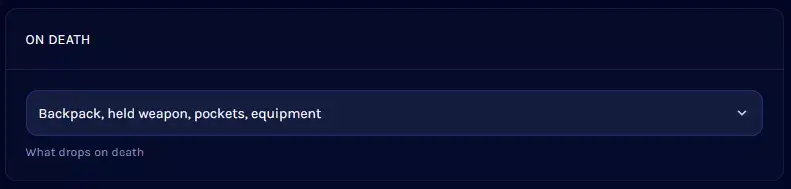
5. Open the dropdown menu and select the desired penalty.
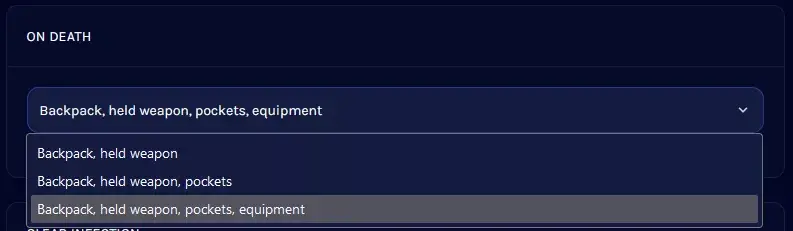
6. Start the server.
V Rising Server
Satisfactory Server
7Days to Die Server
Enshrouded
HumanitZ
SOUL MASK
7Days to Die
V Rising
Myth of Empires
PALWORLD
RUST
Valheim
ARMA3
Project Zomboid
Conan Exiles
How to Change Death Penalty on HumanitZ Server
1.
Log in to Game Panel
.
2.
Stop the server.
3.
Navigate to the
[Start up]
tab.
4.
Find the
[ON DEATH]
section.
5.
Open the dropdown menu and select the desired penalty.
Note
This setting cannot completely disable item dropping. Players will always drop their
backpack
and
equipped weapon
.
6.
Start the server.
How to Change Day/Night Length on HumanitZ Servers
How to Change PvP Settings on a HumanitZ Server
Scroll to top
EN
日本語
English
✓
한국어
简体中文

