
Server Reinstallation Procedure
When Server Fails to Start
If your server fails to start, you can typically resolve the issue through the reinstallation operation in the game panel. This page provides the specific steps and frequently asked questions about reinstallation.
About This Page
When you order a server from BESTNET-GSERVER, game files are automatically installed and the server is configured. However, due to occasional temporary instability on the Steam side (which is the source of file downloads), initial setup rarely fails to complete fully, resulting in server startup failure.
In such cases, executing “Reinstall” from the game panel will almost certainly resolve the issue. The process takes approximately 5–10 minutes. There is no impact to your server configuration or saved data (※see notes below).
When These Symptoms Occur
If any of the following applies, please try the reinstallation procedure in this guide.
⚠ Applicable Symptoms
- The server does not start when you press the “Start” button
- When attempting to start, the status returns to “Offline” within seconds to tens of seconds
- The console displays
Init_Steamworksfollowed immediately by a crash - The console displays
Exit code: 3 - Server fails to start right after ordering, in a state where you have never connected from the game before
💡 Note: If this symptom occurs on a server that has successfully connected from the game at least once, another cause (network or password setting mismatch) may be responsible. In that case, please contact support via ticket.
Reinstallation Steps
Log in to the game panel (https://gsv.bestnetllc.co.jp/) and follow these steps.
-
Open the target server
Log in to the game panel and click on the target Enshrouded server to open it.
-
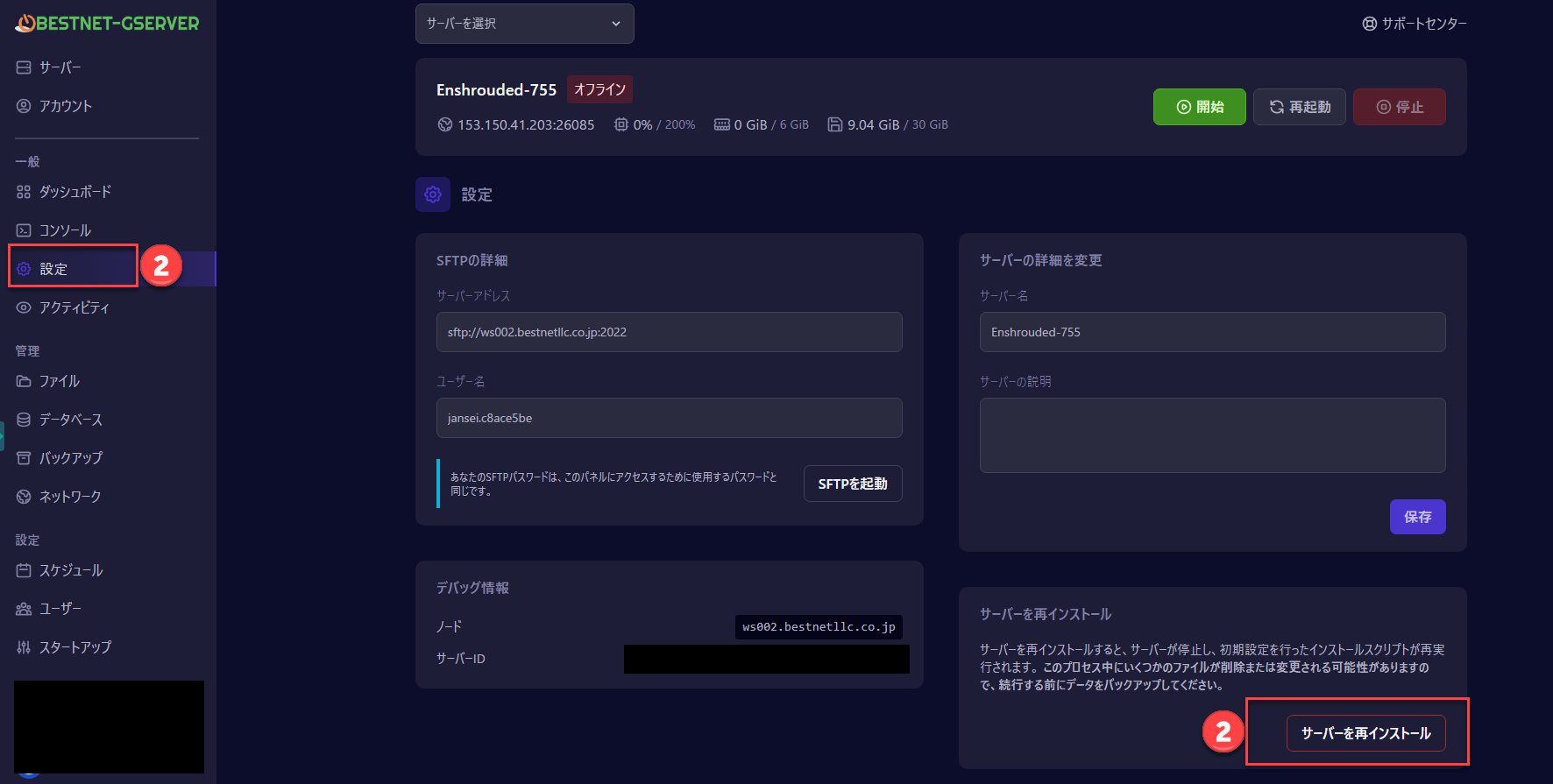
Click “Settings” in the left sidebar
Select the “Settings” menu in the left sidebar of the server screen. This is position ① in the image below.
-
Click the “Reinstall Server” button at the bottom of the screen
On the settings page, you will find the “Reinstall Server” button in the lower right. This is position ② in the image below. A confirmation dialog will appear when clicked.
-
Select “Continue” in the confirmation dialog
A confirmation dialog will appear. Select “Continue” to begin the reinstallation.
-
Wait 5–10 minutes
The game files will be re-downloaded and the server will be automatically set up. The server screen status will display “Installing”.
Time required varies depending on server congestion. During heavy load periods, it may exceed 10 minutes.
-
After installation is complete, click the “Start” button
When the status returns to “Offline”, the reinstallation is complete. Press the “Start” button to launch the server.
When started successfully, the status will change to “Starting” → “Running”, bringing the server online.
✓ Complete: Once the server shows “Running”, your Enshrouded game client can connect. Thank you for your patience.
Important Notes on Reinstallation
Reinstallation re-downloads the server’s game files. Please note the following:
⚠ About Save Data
For servers before first startup (servers that have never been played), reinstallation has no impact.
If you perform reinstallation on a server that has already been played, we recommend taking a backup beforehand as a precaution. For backup procedures, see the separate article “How to Create a Backup“.
💡 About Startup Variables
Variables configured in the “Startup” tab of the game panel (difficulty, password, etc.) are retained after reinstallation. No reconfiguration is necessary.
Frequently Asked Questions
Enshrouded server files are downloaded via the Steam distribution network operated by Valve. Depending on Steam’s network conditions or immediately after game updates, files may occasionally be transferred incompletely, causing startup failure. This is known behavior and is resolved by reinstallation.
If the server still won’t start after two reinstallation attempts, please reply to the support ticket automatically issued when you placed your order, or contact our support team. We will examine specific logs and provide assistance. If a widespread issue is occurring on Steam’s side, such as after a major Enshrouded update, you may need to wait for recovery.
During reinstallation, the server will be offline and players cannot connect. After installation completes, perform the startup operation again.
No, there is no charge. You can use this service any number of times.
Yes, all variables configured in the “Startup” tab of the game panel are retained. No reconfiguration is necessary.
If the Issue Persists
If the server still won’t start after two reinstallation attempts, please contact support.
📩 Support Contact
Reply to the support ticket automatically issued with your order, describing the results of following this article and your current situation. Our team will respond individually.
To create a new inquiry, you can create a ticket here: Support Center
When contacting support, please include the following information for faster assistance:
- Server name (example:
Enshrouded-755) - Server address (example:
153.150.41.203:26085) - Number of reinstallation attempts made
- Error messages displayed on the console (if any)